Product
Dec 7, 2025
Real time Slack Notion sync. Why Tetherly.ai is not a 15 minute Zap | Tetherly.ai
Real time Slack Notion sync. Why Tetherly.ai is not a 15 minute Zap | Tetherly.ai
Most “integrations” quietly admit they are slow.
They poll a database every 5 or 15 minutes.
They fire half the time.
They send alerts long after anyone cares.
That is fine for “log this somewhere”.
It is completely unacceptable for:
Incident management
Critical bugs
Customer escalations
Time sensitive product decisions
If your Slack Notion integration is not real time, it is basically a slightly smarter export.
This article is the real time story for Tetherly.
We are going to cover:
What people usually mean by “real time” and why it is mostly bullshit
How Tetherly actually keeps Slack and Notion in sync in real time
What this looks like for messages, threads and Notion updates
How it changes the way product, engineering and support teams work
If you want the entire system from a high level, you can always read the complete guide to the Slack Notion integration.
Right now we are focusing on speed.
Why real time Slack Notion sync matters at all
People treat “real time” like a vanity word.
In practice it is the difference between:
Catching an incident early
Or explaining it in a post mortem
It is the difference between:
A PM replying in context while the team is still talking
Or leaving “feedback” on a page nobody reads anymore
And it is the difference between:
Support teams actually seeing risk signals
Or finding out when churn is already signed
What life looks like without real time
Here is the usual setup.
You have:
A Notion database for Bugs, Incidents or Tickets
A Zapier or Make scenario that checks for changes every X minutes
A Slack channel where those updates are dumped
Reality:
An incident starts
People talk in Slack
Someone updates Notion
Ten to fifteen minutes later, maybe, a bot posts into a channel
Half your team already hacked a workaround or went back to work
Or:
Support logs feedback in Notion
A CSM sees the Slack notification thirty minutes later
The moment to reply in-thread, in front of the customer, is gone
The integration “works”. It is just late enough to be useless.
Tetherly’s approach is simpler.
If something important happens, Slack sees it right away.
If something important is said in Slack, Notion records it right away.
What “real time” means in Tetherly
Buzzword translation.
When we say real time Slack Notion sync, we mean:
No fixed polling window
Event driven sync in both directions
Updates reflected in seconds
Threads and comments kept in step, not just single messages
You already use Tetherly to:
Real time means those actions are not queued for “later”.
They happen right after the event occurs.
There are three big flows to understand:
Slack message to Notion page or database row
Slack thread replies to Notion comments
Notion changes back to Slack notifications
We will walk through each.
Flow 1. Slack message to Notion in real time
This is the “capture” step.
If this is slow, everything after it is slow.
What happens when you send to Notion
You are in Slack. Something important is posted.
A bug report
A customer complaint
A design decision
A weird metric screenshot
You hit the Tetherly action.
Maybe it is a shortcut, an emoji, or a slash command, depending on how you set it up.
Behind the scenes:
Slack sends an event to Tetherly for that message or thread
Tetherly opens the AI filled modal
Title, summary, tags, priority and owner are prefilled by AI
The right database and template are suggested based on routing rules
You tweak anything that is wrong
You hit Save
Within seconds:
A new Notion page or database entry exists
It already has structured fields and a clean summary
The Slack message is linked back to that page
No polling
No “this will show up later”
No waiting for some third party cron job to wake up
If you want the deep dive on what the AI is doing at this step, read about how Tetherly’s AI actually works
Flow 2. Thread replies and comments in real time
Creating the Notion page is step one.
Keeping it in sync with the ongoing Slack conversation is step two.
This is where most integrations completely fall apart.
How Tetherly handles thread sync
You pick a Slack thread and send it to Notion using Tetherly.
A Notion page is created
The AI writes a summary
The original messages are linked
Now you enable thread sync for that page.
From that point on:
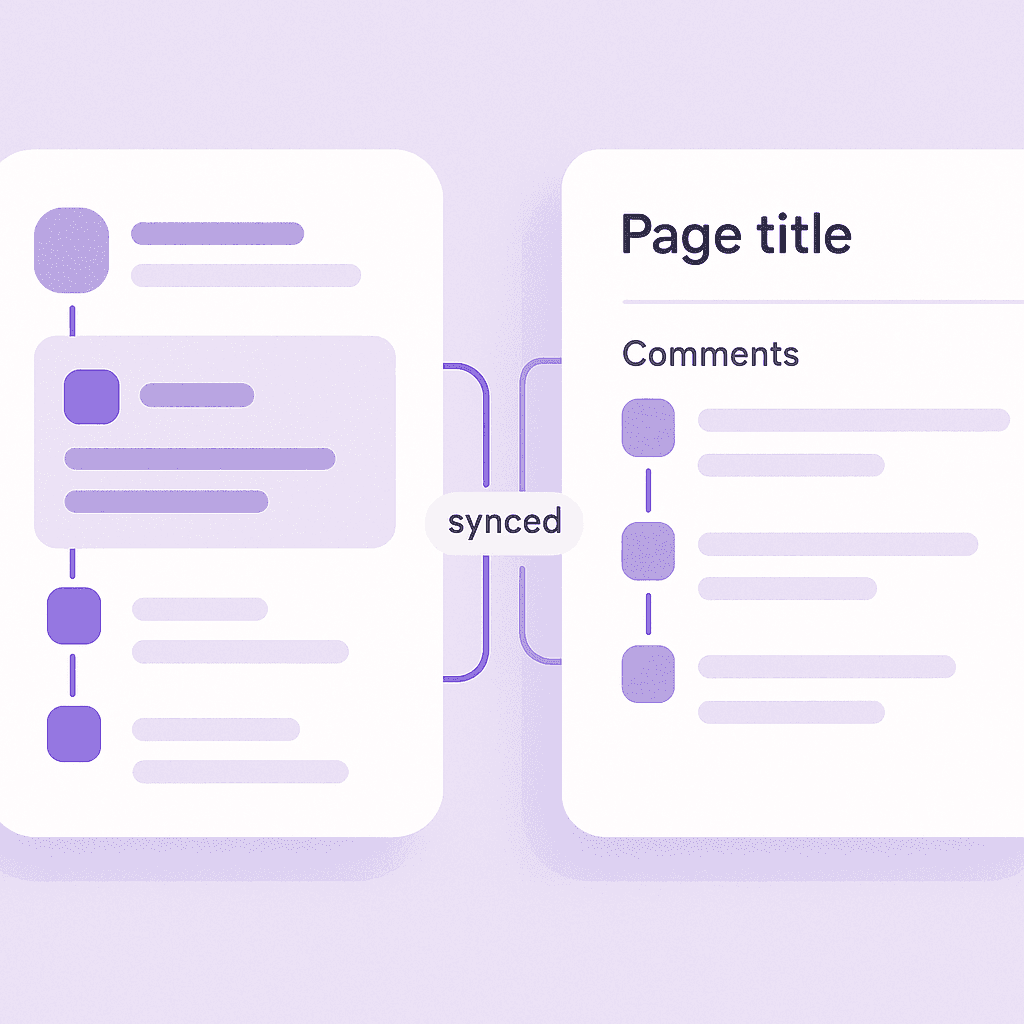
Every new reply in the Slack thread is mirrored as a comment in Notion
Replies show up almost immediately, not “eventually”
Notion comments made on that page can be pushed back to the Slack thread
So if a designer replies in Notion and an engineer lives in Slack, both see the same conversation.
What happens after the initial blast of replies
Most tools handle the first sync, then drop the ball.
Tetherly keeps listening.
Someone reopens the thread a week later
A new reply lands with important context
Tetherly syncs it to the Notion page in real time
That means your “source of truth” is actually up to date.
You are not stuck with a snapshot of what people said three weeks ago.
For the step by step implementation details you can always reference the guide on how to sync Slack thread replies with Notion (keep context forever).
Here we care about the fact that it is instant.
Flow 3. Notion changes back to Slack in real time
Real time is not just Slack to Notion.
It is also Notion back to Slack.
If a task status changes and nobody sees it in Slack, did it really change?
Tetherly listens for Notion events and pushes them into Slack using your notification rules.
You decide:
Which databases or pages matter
Which fields matter
Which conditions should notify anyone
Then Tetherly sends:
Messages into channels
DMs to assignees and owners
Threaded updates under previous alerts
without waiting for some scheduled sync.
We already have the full breakdown in our article on how we handle notificationse without the spam.
Here is the short version.
When someone updates a Notion page that matters, Slack sees it immediately.
Where real time actually changes behaviour
This is the important bit.
Real time is not a “nice to have”. It changes how teams behave.
Incidents and on call
Without real time:
An incident starts in Slack
Someone eventually logs it in Notion
Someone else eventually gets paged or notified
By the time a Notion based process kicks in, the situation has already evolved.
With Tetherly:
The first “this looks bad” Slack thread is turned into an Incident page in seconds
Thread sync keeps all new replies attached to the same page
Real time notifications ping
#incidentsand the on call engineer when severity or status changes
No waiting.
No “who owns this”.
No “where is the doc for this one again”.
Bugs and QA
Without real time:
Someone files a bug in Notion
QA sees it on their next pass
Engineers see it when they feel like looking at the database
With Tetherly:
A bug report in Slack gets turned into a Notion bug in seconds
Status changes to Ready for QA trigger immediate Slack alerts to the QA channel
Comments on the bug page sync back into the original Slack thread
Everyone stays on the same page while still working in their tool of choice.
Customer escalations
Without real time:
A CSM drops a long message in Slack about a customer being angry
Someone says “log this in Notion”
Nobody does it right away
With Tetherly:
The escalation thread is captured into Notion with an AI summary
The right account page or escalation database is updated instantly
Any changes to risk level, health score or churn likelihood send real time alerts to
#cs-alertsor leadership channels
You do not “lose” escalations in Slack history.
You also do not live in Notion dashboards that lag behind reality.
Real time and channel mapping
Real time without structure is just faster chaos.
That is why Tetherly always pairs real time sync with channel to database mapping.
Your admin defines:
Which Slack channels map to which Notion pages or databases
Which types of messages should become which types of entries
Which templates to use for each mapping
You can see exactly how that works in how to organize data flow from Slack to Notion.
Real time then means:
Messages in
#bugsbecome bug entries right awayMessages in
#incidentsbecome incident pages right awayMessages in
#product-feedbackbecome feedback entries right away
The mapping creates structure.
Real time makes that structure live.
What about edits, edge cases and “human screwups”
Real teams are messy. So the integration has to be honest about that.
Edited messages
If someone edits a Slack message after you have already sent it to Notion:
Tetherly can treat the edit as a new event
Depending on your settings, it can update the Notion content or add a comment that shows what changed
You are not stuck with ghost info that does not match the thread.
Wrong target
Sometimes someone sends a message to the wrong database.
Tetherly gives you:
The ability to re route the page to a different database or parent
The ability to turn off thread sync for that page and reattach the thread to a new one
Because everything is event driven, changes take effect quickly.
You are not waiting on a nightly sync to clean up your mistakes.
Conflicts
Two people update the same page from different places.
Tetherly’s job is not to “overwrite reality”. Its job is to:
Reflect both changes in Notion
Reflect the resulting state back into Slack via notifications
Keep the conversation threaded so it is obvious what happened in which order
Real time does not mean “never conflicting”.
It means conflicts show up quickly, while people still remember what they did.
How real time plays with AI and notifications
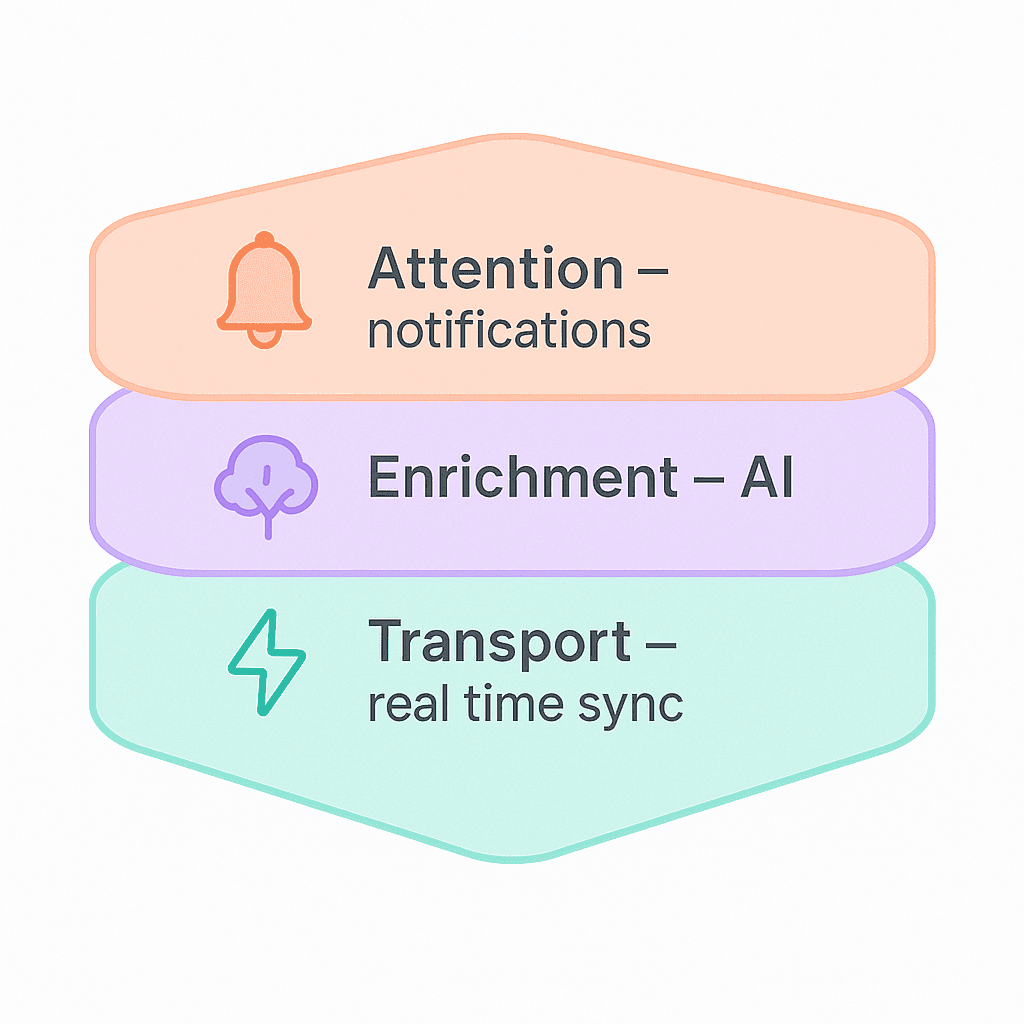
You can think of it like layers.
Real time is the transport layer
AI is the enrichment layer
Notifications are the attention layer
Without real time:
AI fills modals, but people see the results late
Notifications trigger, but on stale data
With Tetherly.ai wired properly:
AI-filled modals create usable pages in seconds
Real time thread sync keeps those pages up to date
Notification rules fire on actual state, right when it changes
If you have not read them yet, line these three articles up:
Slack Notion AI integration. How Tetherly’s AI actually works
This one, for real time
Together they explain why this stack is more than “we put a bot in Slack”.
Where to go next
If your Slack Notion setup still relies on polling and manual copy paste, you are driving with a three second lag on every decision.
To fix that:
Start by connecting Slack and Notion without code using Tetherly
Tighten your capture flows with send Slack messages to Notion automatically
Structure your workspace with organized data flow via channel mapping
Then add this. Full real time sync and thread syncing, plus the AI and notification layers on top
When you are ready to stop accepting “eventually consistent” as a way of working, install Tetherly’s Slack Notion integration, enable real time sync, and let the system keep up with the way your team already moves.