Product
Dec 7, 2025
Slack Notion AI integration. How Tetherly’s AI actually works (auto fill, summaries, routing) | Tetherly.ai
Slack Notion AI integration. How Tetherly’s AI actually works (auto fill, summaries, routing) | Tetherly.ai
Everyone says they have “AI”.
Most of it is lipstick on a macro.
If your Slack Notion AI integration boils down to “we added an LLM somewhere”, you still end up:
Copy pasting messages into Notion
Manually rewriting context
Manually filling fields
Manually hunting for the right database
Tetherly’s whole reason to exist is to kill that kind of busywork.
This article is the deep dive. No hype, no hand waving. Just:
What Tetherly’s AI actually does between Slack and Notion
How it fills modals for you instead of making you type
How it turns messy Slack threads into clean Notion summaries
How it routes messages into the right database, page or sub page
How it ties into search, notifications and the rest of your stack
If you just want a surface overview, go read the complete guide to the Slack Notion integration.
If you want to know what the AI layer is actually doing, keep reading.
Why AI even matters for Slack and Notion
Let’s start with the obvious.
Slack and Notion are not short on features. The problem is humans.
You know the pattern:
Someone drops an important update in a random Slack channel
Someone else says “this should live in Notion”
Nobody wants to be the person that copies, cleans, structures and files it
Two weeks later you are digging through search results and half baked Notion pages trying to reconstruct what happened
The work is not “thinking”. The work is:
Turning Slack chaos into structured Notion entries
Remembering which database and which template to use
Summarising long threads into something readable
Keeping fields like status, priority, owner and tags up to date
That is exactly the kind of repetitive, context heavy grunt work that AI should be killing.
So the question is not “does your Slack Notion integration use AI”.
The question is “does your AI remove copy paste and decisions from your life”.
Tetherly’s answer is yes. Here is how.
What Tetherly’s AI layer actually does
On the product page you already promise that:
AI auto fills fields
AI summarises threads
AI routes data where it belongs
We are going to unpack each of those so they are not just marketing bullets.
High level, the AI shows up in four key moments:
When you send something from Slack to Notion
When you capture or summarise a Slack thread
When you need to decide where the data should live in Notion
When you search and review what you have already stored
We will go through each in detail.
AI filled modals. Stop typing the same crap over and over
The heart of your Slack Notion AI integration is the “Send to Notion” moment.
You hit a shortcut, an emoji or a slash command in Slack.
Tetherly pops a modal.
That modal is where most tools waste your time. They give you:
A blank title field
A blank description field
A long dropdown of databases you probably do not remember
Optional fields that nobody fills correctly when they are in a rush
Tetherly’s AI does the opposite. It meets you halfway.
How the AI filled modal works
You select a Slack message or thread.
Tetherly reads:
The message content
The surrounding replies
The channel it came from
The sender and any mentions
Any obvious intent markers like “bug”, “request”, “incident”, “idea”
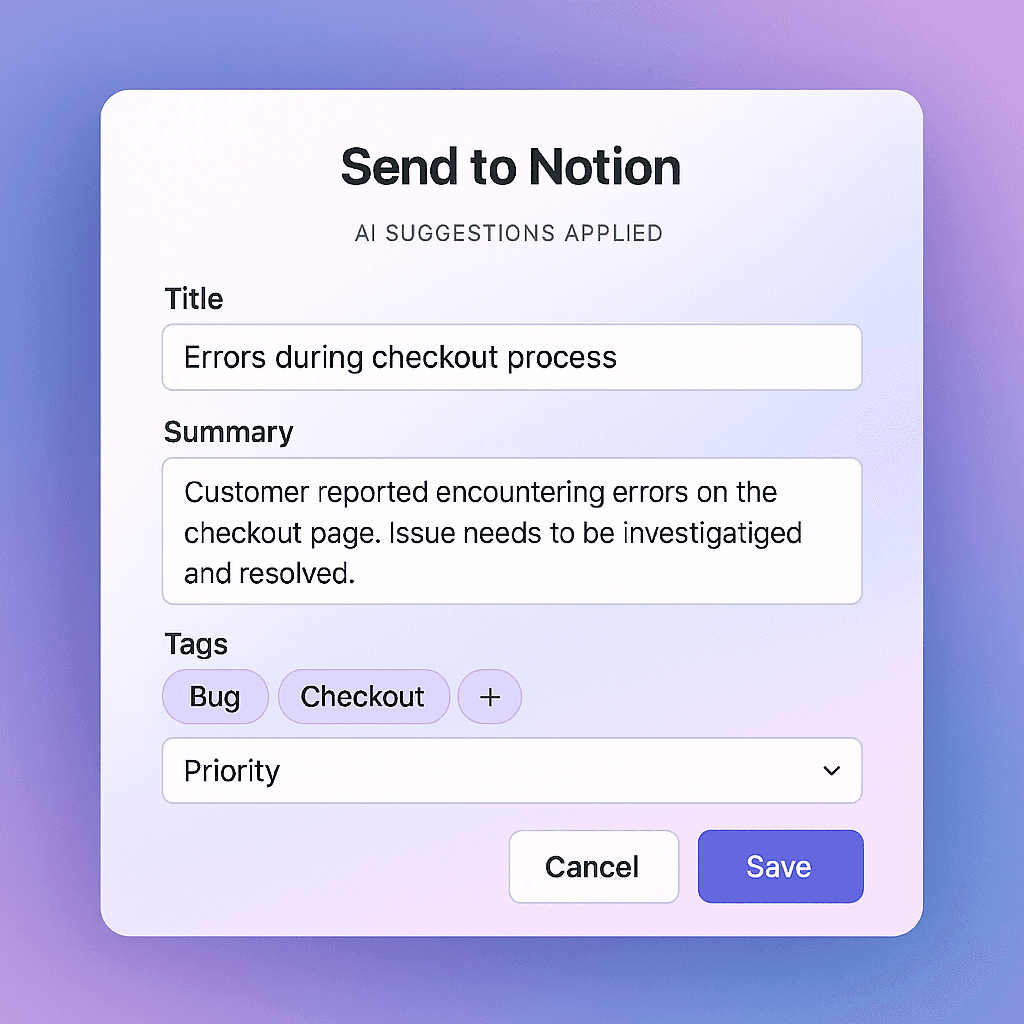
When the modal opens, the AI has already:
Proposed a title that does not suck
Generated a short summary of the thread or message
Suggested tags based on keywords, product areas, customers or features
Filled in priority or severity where it is obvious (for example, “production down” is not a P3)
Suggested an owner or assignee based on who is involved in the conversation
So instead of staring at a blank form, you are editing something that is already 80 percent correct.
You change what is wrong. You keep what is right. You hit save.
Where the AI guesses come from
The AI is not making things up out of nowhere. It is using:
The text of the Slack message and surrounding thread
The channel name and description (for example,
#bugsvs#feature-ideas)The pattern of how this channel is usually mapped to Notion
Past examples of similar messages and what you did with them
Over time, it gets better.
If you keep changing priority from “Medium” to “High” for a certain customer, it will start suggesting High.
If you consistently tag messages mentioning a specific product area, it will learn that association.
You still have final control. AI is there to propose, not to veto.
AI thread summaries. One click “too long; did read”
Slack threads are where most of your real thinking happens.
They are also where context goes to die.
Scrolling through fifty replies to understand why a decision was made is not a good use of anyone’s time.
Tetherly’s AI layer turns a messy thread into a clean Notion record.
Capture the whole thread, not just one message
When you choose to send a thread to Notion:
Tetherly grabs every message in that thread
The AI reads the entire conversation, not just the first or last message
It identifies what the thread was actually about, not just what was said
From there it produces:
A short, punchy summary describing the outcome
A bullet list of key points or decisions
A list of open questions or follow ups, if it detects that nothing was resolved
All of that lands in the Notion page.
The raw messages or a link back to the Slack thread are still available, but the summary means most people never have to leave Notion.
Keep context aligned with your data
This is where the AI joins forces with thread sync and notifications:
The AI gives you a clear summary when the page is created
Thread sync keeps future Slack replies attached as proper Notion comments
Notification rules can ping the right people when something important changes
So for a critical bug thread:
You get a Notion bug page with a clean “Story so far”
Engineers keep talking in Slack
Their replies sync as comments on that same page
Notifications alert whoever needs to know when status or priority changes
You are not manually summarising anything. You are not copy pasting.
You are choosing “send to Notion” once and letting the AI and rules handle the rest.
AI powered routing. Put things in the right place the first time
The second problem AI solves is “where the hell should this live”.
Most teams have:
A Bugs database
A Product ideas database
A Customer feedback database
An Incidents database
A random pile of unstructured pages
Your average Slack Notion integration punts that decision to the human every time.
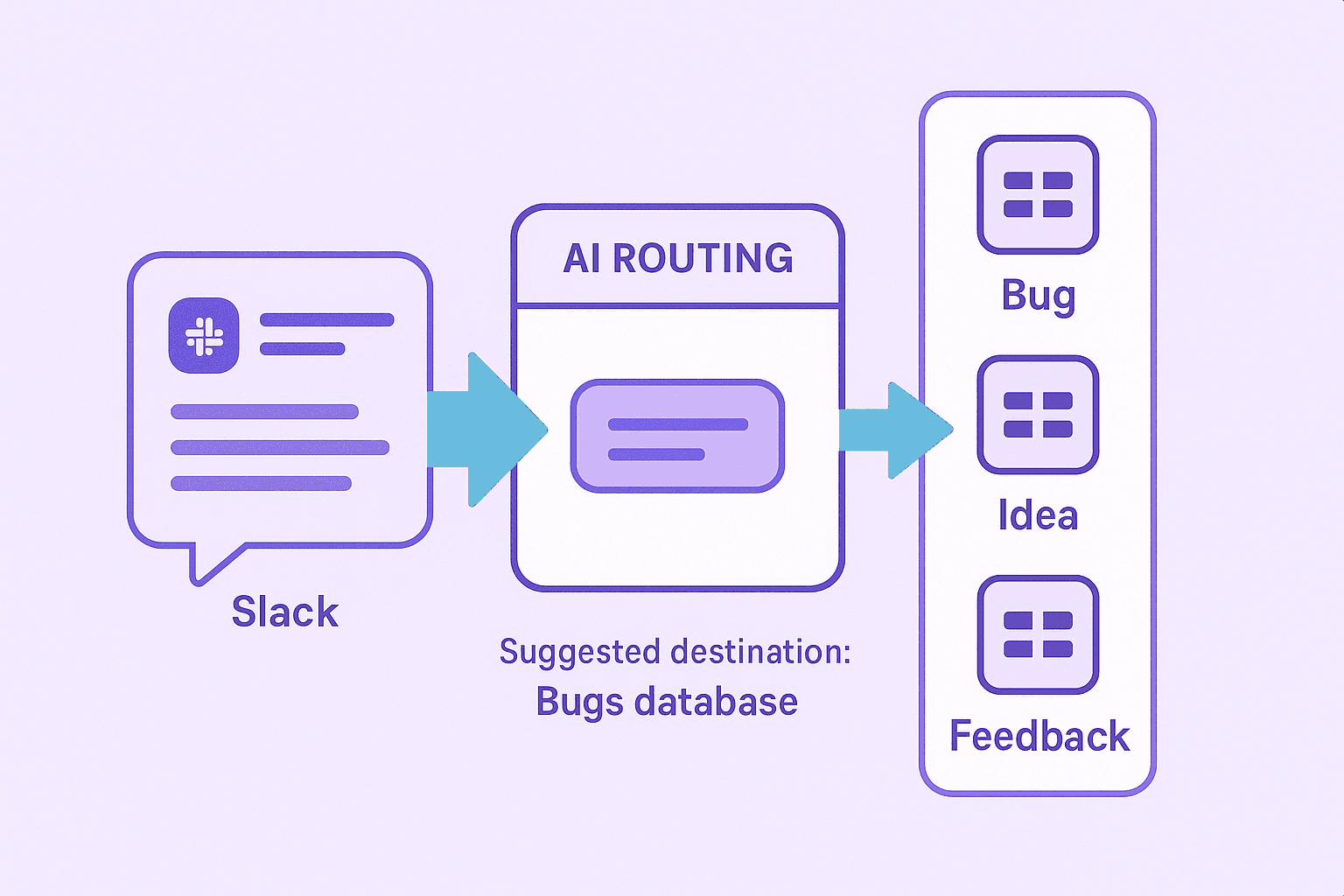
Tetherly uses AI plus your admin rules to make smart guesses for you.
Channel based defaults plus AI overrides
You already define high level routing in Tetherly:
#bugsusually goes to the Bugs database#feedbackusually goes to the Feedback database#incidentsusually goes to the Incidents database#productusually goes to the Product Ideas or Roadmap database
The AI respects those rules as the default.
Then it adds intelligence on top:
If someone posts a clear incident in a general channel but mentions “prod is down”, it can suggest sending it to the Incidents database instead of the default
If a message in
#feedbackis clearly a bug and not a feature request, it can suggest the Bugs database templateIf you are in a catch all channel like
#generaland the message looks like a feature idea, it can propose Product Ideas as the target
Again, you are always in control. The AI simply suggests the most likely destination.
Suggesting how the data needs to be added
Routing is not just picking the database. It is also picking the concrete target.
You often need to:
Append to an existing page (for example, an existing customer account page)
Create a new database entry (for example, a new bug)
Create a sub page under a parent (for example, Incident pages under an Incident log)
The AI helps here by:
Suggesting an existing page when it detects matching names or identifiers
Suggesting a new entry when the message clearly describes a new bug or incident
Suggesting a sub page under a specific parent when the channel or content matches a known pattern
So a message that says:
“Acme Corp saw a crash on checkout again. Same thing as last week.”
might trigger:
Target. “Acme Corp” account page
Content. New sub page called “Checkout crash – March 12” with a summary and tags
You review, adjust if needed and confirm.
The AI has already done the thinking that would have taken you a couple of minutes.
How AI flows look for real teams
Let us make this concrete with a few personas.
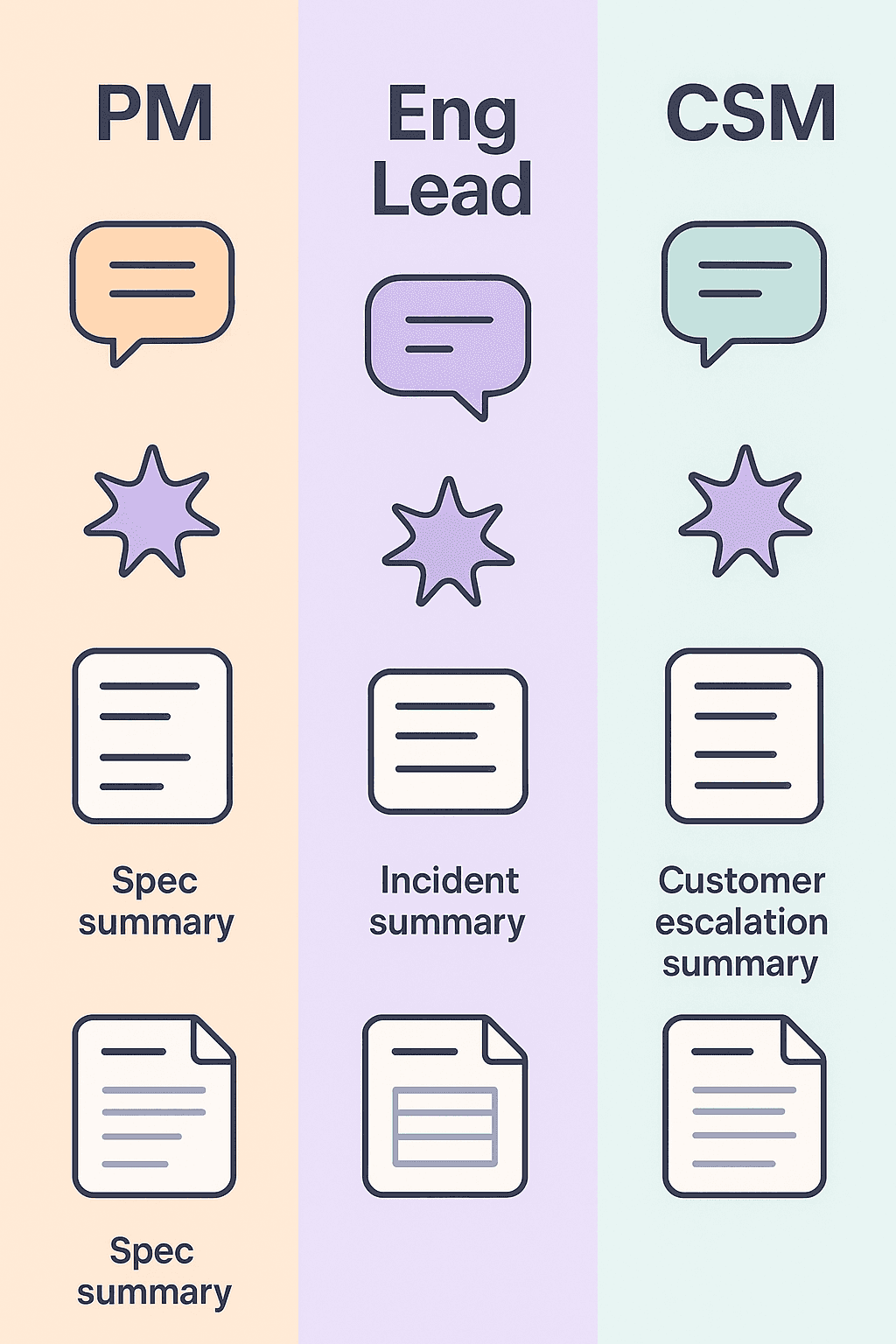
For product managers
Your life is specs, feedback and “what are we building next”.
AI helps you by:
Turning raw Slack feedback into structured Notion entries in the Feedback or Product ideas databases
Filling titles, tags and priorities so you do not rewrite the same phrases twenty times a day
Summarising long debates in
#productinto a single “Decision and rationale” section in Notion
You combine that with:
The result. Product decisions and feedback actually live where they should, and you did not spend all day formatting.
For engineering leads
You live in bugs, incidents and RFCs.
AI helps you by:
Turning chaos in
#eng,#supportor#incidentsinto clean bug or incident pages with status, severity and owners prefilledSummarising incident threads into a “Timeline and impact” section for later post mortems
Suggesting appropriate databases and templates when someone posts “prod is down” in the wrong channel
Combine that with:
You can keep talking in Slack while knowing that the Notion record will be coherent and usable afterwards.
For customer success and support
You get yelled at in every direction. Your main risk is dropping the ball.
AI helps you by:
Detecting customer names, account IDs or product names in support channels and attaching them to the right account page
Summarising long complaint threads or escalations into a single Notion entry with clear next steps
Suggesting appropriate sentiment tags or health indicators based on the language in the thread
Paired with:
Notion to Slack notifications for status changes
Account health dashboards built on top of these AI enriched entries
you get a system that catches and structures everything without you turning into a human ETL pipeline.
Why this beats “AI powered” Zap chains and native hacks
You could try to fake some of this with existing tools.
Native Notion + Slack integration
You get:
Basic notifications
Basic sharing
Zero understanding of your workflow
Zero help with titles, tags, summaries or routing
Good enough if you just want “post to Slack when this page changes”, not enough if you want an actual Slack Notion AI integration.
Zapier, Make and friends
You can absolutely:
Poll a database
Send messages into Slack
Call an LLM step in the middle to generate a summary
You will also:
Maintain dozens of brittle workflows
Pray nothing changes in your schema
Spend half a day debugging when a field name changes
Still have no opinionated default flows tuned for Slack and Notion together
Tetherly bakes the AI and the Slack Notion specifics into one product.
You do not get a box of Lego bricks. You get a system that actually runs.
How to roll this out without breaking your team
AI is only useful if people trust it. So roll it out like this.
Step 1. Pick two or three high impact flows
Examples:
Critical incidents
Customer escalations
P0 bugs
Feature requests from key customers
Wire AI filled modals and simple routing for those first.
Step 2. Use AI as a suggestion engine, not a dictator
Tell your team:
“The AI will prefill things for you. Your job is to fix whatever is wrong, not to write everything from scratch.”
They get faster workflows without feeling like they are fighting a black box.
Step 3. Layer notifications on top
Once AI is populating fields correctly and routing is solid:
Add notifications for the most important state and field changes
Keep rules simple at first. Expand as you see what works.
Step 4. Audit and adjust
Every couple of weeks:
Skim through recent AI created pages
Check where titles, tags or priorities are consistently off
Update your patterns or rules based on what you see
The AI improves as you correct it.
The goal is not perfection on day one. The goal is “substantially less crap work every week”.
Where to go next
If you have read this far, you do not just want another integration that copies text around.
You want Slack and Notion to feel like one system:
Messages flow into the right Notion databases
Threads turn into clean summaries
Fields stay up to date
Notifications tell the right people the right thing at the right time
To see how the whole picture fits together, read:
The complete guide to the Slack Notion integration for the end to end story
How to send Slack messages to Notion automatically to tighten up your capture flows
How to organize data flow from Slack to Notion so routing is not chaos
Notion Slack notifications without the spam to clean up your alerts
And when you are ready to stop babysitting all of this with scripts and Zap chains, just install Tetherly’s Slack Notion integration, let the AI fill the forms, and keep your team focused on work that is not copypasta.